


Lilt - Offline Music Player
4.889.00 Reviews
App Specs
- Version
- 1.0.9
- Updated On
- License
- Free
- Downloads
- 100,000+
- Developer
- nashmi jo
- Categories
- Entertainment
- Platform
- Android
Screenshots
 Analysis by AppCompare
I like music apps that understand their job and stop there. Lilt - Offline Music Player takes that approach: it is an entertainment app built around playing audio stored locally on your device, without trying to become a streaming service, social network, or recommendation engine. After spending time with it, my main impression is that its value depends less on a huge feature list and more on whether you want a calm, direct way to reach your own music.
That focus makes Lilt easy to understand. You bring your audio files with you, open the player, and use the app as a personal listening space. The developer is nashmi jo, and the app is free with an Everyone content rating. It runs on Android 8.0 or later, which keeps it accessible to people using older supported phones as well as newer devices.
The current release is version 1.0.9, and the app has already passed the hundred-thousand-install mark. Its average score is 4.8 from roughly 2,400 ratings, with 89 written reviews. Those figures suggest that its simple idea is connecting with a noticeable group of listeners, although I would still judge it by the daily experience rather than by the score alone.
Why a local player can still be useful
Most people now discover music through streaming platforms, but streaming is not always the most comfortable answer. A subscription library can be excellent when I want discovery, playlists, or access to artists I do not own. It is less convenient when I already have a collection of downloaded albums, recordings, language lessons, personal mixes, or audio files that do not belong to a streaming catalog.
That is where Lilt makes sense. Instead of asking me to search through an online service, it keeps the listening experience close to the files already on the phone. I can use it for music saved for a flight, albums copied from a computer, or audio I want available when mobile data is unreliable. The benefit is not excitement; it is fewer steps between deciding what I want to hear and pressing play.
I also appreciate the mental difference between a local player and a streaming app. Streaming services constantly encourage me to browse, compare, and discover something else. That can be enjoyable, but it can also turn a five-minute listening break into an endless search. Lilt feels better suited to the person who has already chosen the audio and wants the app to stay out of the way.
In everyday use, I would picture opening it during a commute where signal quality changes from one street to the next. Rather than waiting for a playlist to load or hoping a download was saved correctly inside a streaming service, I would use files stored on the device. The practical advantage is especially clear for people who travel, conserve data, or keep a carefully organized personal collection.
Worth Reading Before You Choose

EA SPORTS FC Mobile 26 Is a Bigger Football Game, but It Takes Time

Flipboard Shows What News Apps Must Do Beyond the Feed

Switching to Android Auto Means Rethinking Your Driving Routine

Google Calendar Makes a Crowded Week Easier to Manage

Ludo King Makes the Most of the Minutes Between Plans

Baby Panda World Brings Quick Play to Modern Phones, but Its Game Library Feels Busy
The strongest part is the narrow purpose
The store summary describes local audio in simple terms, and that is a fair way to understand the experience without turning it into a complicated product. Lilt’s strongest quality is its restraint. A focused player can feel faster to learn because I do not have to navigate through unrelated entertainment sections before reaching my own tracks.
That simplicity also makes it approachable for someone who finds large streaming apps overwhelming. If a family member only wants to play audio saved on a phone, a smaller local player may be easier to explain than an app filled with subscriptions, recommendations, podcasts, artist pages, and changing menus. Lilt is a reasonable choice when “play my files” is the complete requirement.
There is another useful distinction: local playback gives me more control over what I hear. I am not dependent on a catalog changing, an album disappearing, or a service deciding which version of a track should appear in search. My own files remain the center of the experience. That matters for recordings, independent releases, older material, and audio that is not distributed through mainstream platforms.
For focused listening, I would use a simple routine. Before leaving home, I would place the albums or recordings I expect to need on the device, then use Lilt as the dedicated player rather than mixing them into a crowded downloads folder. This is not a flashy trick, but it turns a general-purpose phone into something closer to a small offline music library.
Useful situations beyond ordinary music listening
Lilt’s local approach can help with more than commercial songs. Someone might keep spoken-word recordings, rehearsal tracks, personal compositions, public-domain audio, or language practice files on a phone. A streaming app is usually designed around its own catalog, while a local player is naturally better for material I have obtained or created elsewhere.
I can also see it working well for listeners who deliberately avoid constant connectivity. Keeping audio on the device can make a difference in places with weak coverage, during travel, or when a person wants to reduce background data use. The important trade-off is that the preparation happens before listening: the files must already be available locally.
Another less obvious use is separating intentional listening from algorithmic discovery. I might use a streaming service when I want suggestions, then switch to Lilt when I want to revisit a particular collection without recommendations interrupting the mood. That two-app workflow is more sensible than expecting one application to be perfect at both discovery and private playback.
For parents or younger listeners, the Everyone rating may also make the app feel less intimidating as a basic audio tool. Still, the rating should not be confused with a promise that every locally stored file is suitable for every listener. The content comes from the user’s own device, so the listening library remains the responsibility of the person managing it.
The limitation: simplicity cannot replace a full music ecosystem
The same narrow focus that I enjoy is also the main reason some people should skip Lilt. If I want a giant searchable catalog, editorial playlists, artist recommendations, lyrics, social sharing, or a complete discovery system, a conventional streaming platform will probably serve me better. Lilt is not the right replacement for every kind of music app.
Its offline-first idea also creates a practical responsibility. The app can only be as useful as the audio I have prepared on the phone. A person who expects to install an app and instantly access a broad collection may find the experience limited. The convenience arrives after the library is ready, not before.
That distinction is easy to miss when moving from streaming. With a subscription service, I can search for something unfamiliar and start listening almost immediately. With Lilt, I need to think ahead if I want a specific album or recording available away from home. For frequent explorers, that extra preparation may feel like friction rather than freedom.
I would also avoid choosing it solely because it has a high average rating. A strong score can indicate that the app satisfies its intended audience, but it does not change the basic trade-off between local files and online catalogs. Someone who wants advanced organization, broad integrations, or a highly personalized listening system should compare Lilt with more feature-heavy alternatives before switching.
How I would decide between Lilt and the usual alternatives
My choice would depend on the question I am asking the app to answer. If the question is “What should I listen to next?”, I would lean toward a streaming service with discovery tools. If the question is “Can I play the audio I already keep on this phone?”, Lilt becomes much more attractive.
Streaming apps win on convenience at the beginning. Their libraries are ready, their search is built around online content, and their recommendations can introduce me to something new. Their disadvantages are the need to work within a service’s catalog and the possibility that the listening experience becomes tied to an account, connection, or subscription model.
Lilt wins on directness. It is free, has a clear local purpose, and does not ask me to treat my personal collection as part of a larger online platform. The cost is that I need to manage the collection myself. Neither approach is universally better; they solve different problems.
Compared with a phone’s default audio player, Lilt’s appeal is that it is chosen specifically for this local-listening role rather than being one small function among many. Whether that feels meaningfully better will depend on the default player already installed. If the built-in option is comfortable and reliable, changing may not be necessary. If it feels cluttered or awkward, a dedicated alternative can be worthwhile.
Small habits that make the app more practical
I would start by treating the phone’s storage as a listening shelf rather than a dumping ground. Keeping albums, recordings, and other audio in a deliberate structure makes any local player easier to use. Lilt can provide the playback destination, but good file organization remains important because the app cannot make an untidy personal library feel magically curated.
For travel, I would prepare a short selection instead of copying everything. A compact offline collection is easier to browse and reduces the chance that I will spend the journey searching through files I did not really intend to hear. This is one of the key differences from streaming: planning the library becomes part of the listening experience.
I would also use separate collections for different purposes, such as regular music, spoken audio, and practice recordings. The reason is not that Lilt turns these into special categories; it is that separating them before opening the player makes the local workflow more predictable. This is particularly useful when one phone serves several roles during the day.
Finally, I would test the app with the exact type of audio I plan to use before relying on it for a trip or a long offline period. A local player is only valuable when the files I care about are easy to locate and play in the way I expect. That simple check can prevent disappointment later and helps reveal whether Lilt suits my personal library.
Who should use it, and who should look elsewhere
I would recommend Lilt to someone who already owns audio files and wants a clean, free way to play them on Android. It is especially suitable for listeners who value offline access, prefer choosing their own collection, or feel distracted by the constant discovery features in larger entertainment platforms.
It may also suit students with recorded material, musicians carrying reference tracks, travelers preparing audio in advance, and anyone who wants a personal library that is not dependent on a streaming catalog. The app’s Everyone rating and support for Android 8.0 or later make it approachable for a broad range of users, provided their needs remain centered on local playback.
I would not make it my first recommendation for a person who has no stored music and expects an all-in-one source for new releases. I would also point heavy playlist curators, social listeners, and people who rely on recommendations toward a more comprehensive service. Lilt’s strength is not breadth; it is the absence of unnecessary distance between the listener and the files.
There is a useful middle ground for people who are unsure. Keep a streaming service for discovery and use Lilt for audio that must remain available locally. That arrangement avoids forcing one app to handle two very different jobs. It also lets me judge Lilt on what it does best instead of expecting it to imitate a much larger platform.
My final view after using this focused player
Lilt - Offline Music Player is a good example of a small entertainment app making a clear choice. It does not need to compete with streaming services on catalog size when its real appeal is personal, local listening. I found that clarity more valuable than a long list of ambitious extras because it keeps the central task understandable.
The recommendation comes with an important condition: I would choose it only if my audio is already stored on the device or if I am willing to prepare it there. That requirement is not a minor detail; it defines the whole experience. For me, the trade-off is worthwhile when I want dependable access to selected music or recordings without browsing an online service.
With a 4.8 average and more than a hundred thousand installs, Lilt has clearly found an audience for its straightforward idea. The free price lowers the barrier to trying it, while the Everyone rating keeps its presentation broadly accessible. Still, the best reason to install it is not popularity. It is the practical need for a dedicated local player that does not compete with my own listening choices.
My verdict is positive but specific: choose Lilt when offline audio and a simple personal library matter more than discovery. Skip it when you want a complete streaming ecosystem. For the right listener, its restraint is the feature, and that makes it an easy app to recommend to a friend who simply wants their own music to play without fuss.
Pros
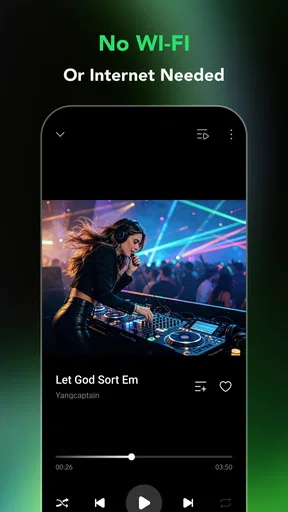
- Plays downloaded music without requiring an internet connection.
- Supports background playback while using other apps.
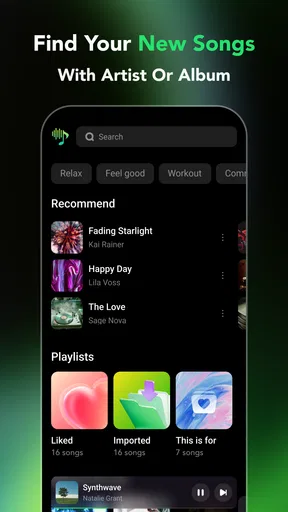
- Simple interface makes browsing local tracks quick and easy.
- Uses no mobile data for offline listening.
- Useful for travelers or areas with unreliable connectivity.
Cons
- Requires music files to be stored on your device first.
- Storage space can fill quickly with large music libraries.
- May lack advanced streaming and discovery features.
- Limited usefulness if you primarily listen to online music.
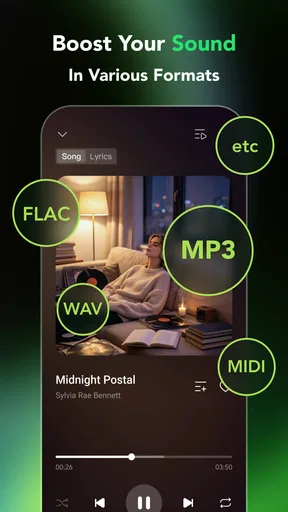
- Compatibility may vary with certain audio file formats.
FAQs for Lilt - Offline Music Player
What is Lilt - Offline Music Player, and what does it do?
Lilt - Offline Music Player is designed for listening to music stored locally on your Android or iOS device without relying on mobile data or an internet connection. After adding compatible audio files, you can browse your personal library, organize tracks, and play music offline. It is aimed at users who prefer a private, lightweight player rather than a streaming service with an online catalog.
Can I use Lilt without an internet connection?
Yes, offline playback is the main reason many users choose Lilt. Once your music files are already saved on the device and recognized by the app, you can listen without Wi-Fi or cellular data. Internet access may still be needed for downloading music through another service, transferring files, or using any optional features that depend on external services, but regular playback should work offline.
Does Lilt include songs, or do I need to add my own music?
Lilt is an offline player, not a music-streaming platform, so it generally does not provide a built-in catalog of commercial songs. You need to transfer or download legally obtained audio files to your device before listening. The exact import process can depend on your operating system and storage permissions. Users should also check supported formats and make sure their files are accessible to the app.
What features should I expect while playing music in Lilt?
The experience focuses on essential local playback features, such as browsing your collection, selecting tracks, controlling playback, and listening without interruptions caused by network connectivity. Depending on the version installed, you may also find playlists, album or artist organization, background playback, shuffle, repeat, and lock-screen controls. Feature availability can vary between Android and iOS, so reviewing the current store listing is recommended.
Is Lilt a good alternative to Spotify, Apple Music, or other streaming apps?
Lilt can be a good alternative if your priority is offline access to music you already own, reduced data usage, and a simpler listening experience. However, it is not intended to replace streaming services that offer huge online libraries, recommendations, synchronized accounts, or subscription-based downloads. Choose Lilt if you value local playback and privacy; choose a streaming app if discovering and accessing new music is more important.


